Your cart is empty!
Display Login Form
public function onDisplayUserLoginForm(string $location) : string
Fires while displaying the form to log in.
Description
Trigger event to let the plugins add custom HTML contents within the login form. This hook fires several times, once for each supported location.
TIP: in case you own a plugin able to handle a log in through third party systems (such as Facebook or Google), you can invoke that plugin within the login position.
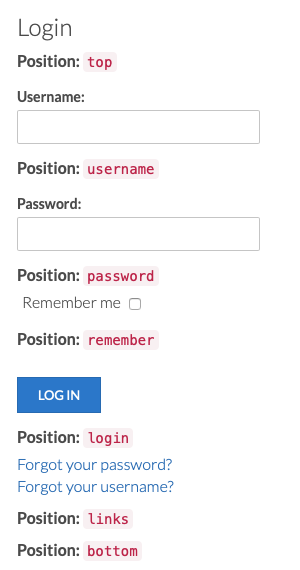
The following image indicates where the resulting HTML can be appended.
Parameters
- $location
-
(string) The position in which the HTML code will be placed.
top- at the beginning of the login form;username- after the username field;password- after the password field;remember- after remember checkbox;login- after login button;links- after the footer links (triggers only in case the links should be displayed);bottom- at the end of the login form.
Return Value
String. The HTML to include.
Example
/**
 * Trigger event to let the plugins add custom HTML contents within the user login form.
 *
 * @param   string  $location  The HTML will be always placed after the specified location.
 *
 * @return  string  The HTML string to include within the document.
 */
public function onDisplayUserLoginForm($location)
{
    if ($location == 'password')
    {
        // append custom HTML after the password field
        return '<code>HTML CODE WILL BE ADDED HERE</code>';
    }
}
Changelog
| Version | Description |
|---|---|
| 1.7 | Introduced. |
Last Update: 2021-10-11 10:12
Helpful?